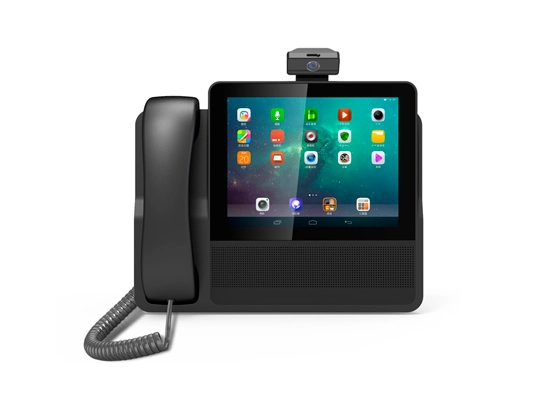
Features dual-SIM capability and extensive network band compatibility, including FDD/TDD LTE.
Delivers high-speed data up to 150Mbps download and clear voice calls.
Stores 800 contacts, 600 call logs, and 300 SMS messages.
Features MP3 ringtones and FM radio for customization.
There's a 3000mAh battery inside, allowing for extended usage.
WiFi hotspot supports up to 10 simultaneous users.
Includes hands-free calling, emergency dialing, and multilingual support (English, Arabic, etc.).
Excellent for use in homes, offices, and remote areas.
Model Number | LTE818 |
Type | Table WiFi Telephon |
Module Chipset | Spreadtrum T117 |
Language | English, Arabic, Urdu, Persian, Russian, French, Spanish, Portugal(customizable) |
SIM | Dual card dual standby |
Memory | MCP(4Gb+2Gb) |
Frequency | GSM 850/900/1800/1900Mhz |
FDD/TDD | B1/B3/B5/B7/B8/B20/B28A/B28B/B38/B40/B41 |
Data rate | |
GSM CS | UL 9.6kbps/DL 9.6kbps |
WCDMA | UL 11.5Mbps/DL 42.2Mbps |
FDD | UL 50Mbps/DL 150Mbps |
WiFi Hotspot standard | IEEE 802.11b/g/n |
Antenna | TNC antenna |
FM Radio | Support |
Battery | 3000mAh(4.44Wh), Li-ion Battery |
Screen backlight, support night lighting
Two-way SMS, voice calls and caller ID
Menu display
Stores 800 contacts and 600 call logs for viewing and returning calls
Supports 300 SMS messages
Supports up to 10 ring tone options. Mp3 can setting as ring tongs
Adjustable ring tone and volume
Supports hands-free calls and emergency calls
FM Mp3 Mute Record(should input TF card)
Supports charging status display
Supports charger only
Long battery life, long talk time
Support WIFI hotspot for 10 users at the same time
1. Phone Body
2. Handset
3. Coiled cord
4. 1000mAh Li Battery
5. AC Adaptor 12V1A with DC5521/Type C port
6. TNC External Antenna
7. User Manual
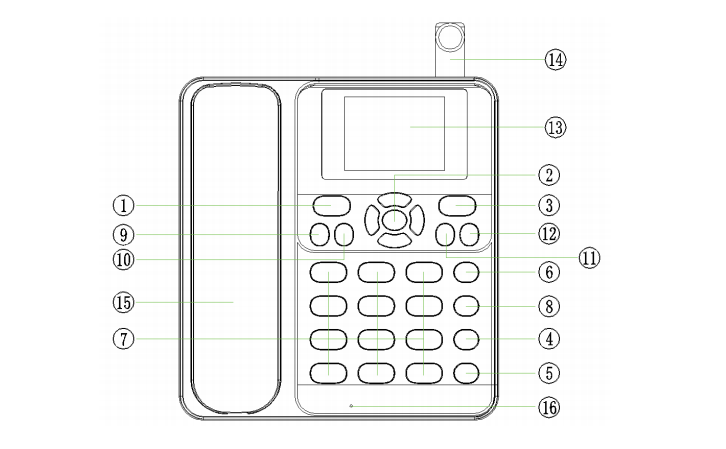
1. Left function key
· At standby mode, press this button to enter the main menu
· press this button to select the menu or operation corresponding to the text on the left side of the bottom of the screen.
2. Direction key
· At standby mode, press OK to enter the main menu
· At standby mode, press the arrow keys to enter the corresponding shortcut menu
· At call modes, press the direction button to adjust the call volume
3. Right function key
· press this key to select the menu or operation corresponding to the text on the right side of the bottom of the screen
4. Power key
· Close a call or reject a call
· long press this button to turn on or off standby mode
· At non-standby mode, press this button to return
5. Hands-free key
· At standby mode, press this button to use speakerphone to make or receive calls
· press this button to cancel or end a call at hands-free mode
6. Dial/Redial key
· make or receive calls
· At standby mode, press this button to check the call record
7. Number and symbol keys
· enter Numbers or characters
· At standby mode, long press 1-9 number keys for speed dial
· At edit mode, press # key to switch input mode
· At edit mode, press * to open the symbol list
8. WIFI key
At standby mode, press this button to enter Wi-Fi menu
9. Mp3 key
At standby mode, press this button to enter Wi-Fi menu
10. FM key
At standby mode, press this button to enter Wi-Fi menu
11. Mute key
At standby mode, press this key to Mute mode
12. Record key
At standby mode, press this button to enter Calls menu
13. Mute key
13.128*64
14. Record key
At standby mode, press this button to enter Calls menu
15. Mic
Mic for Voice