

Building a wireless bridge network across kilometers may seem easy on a network diagram.
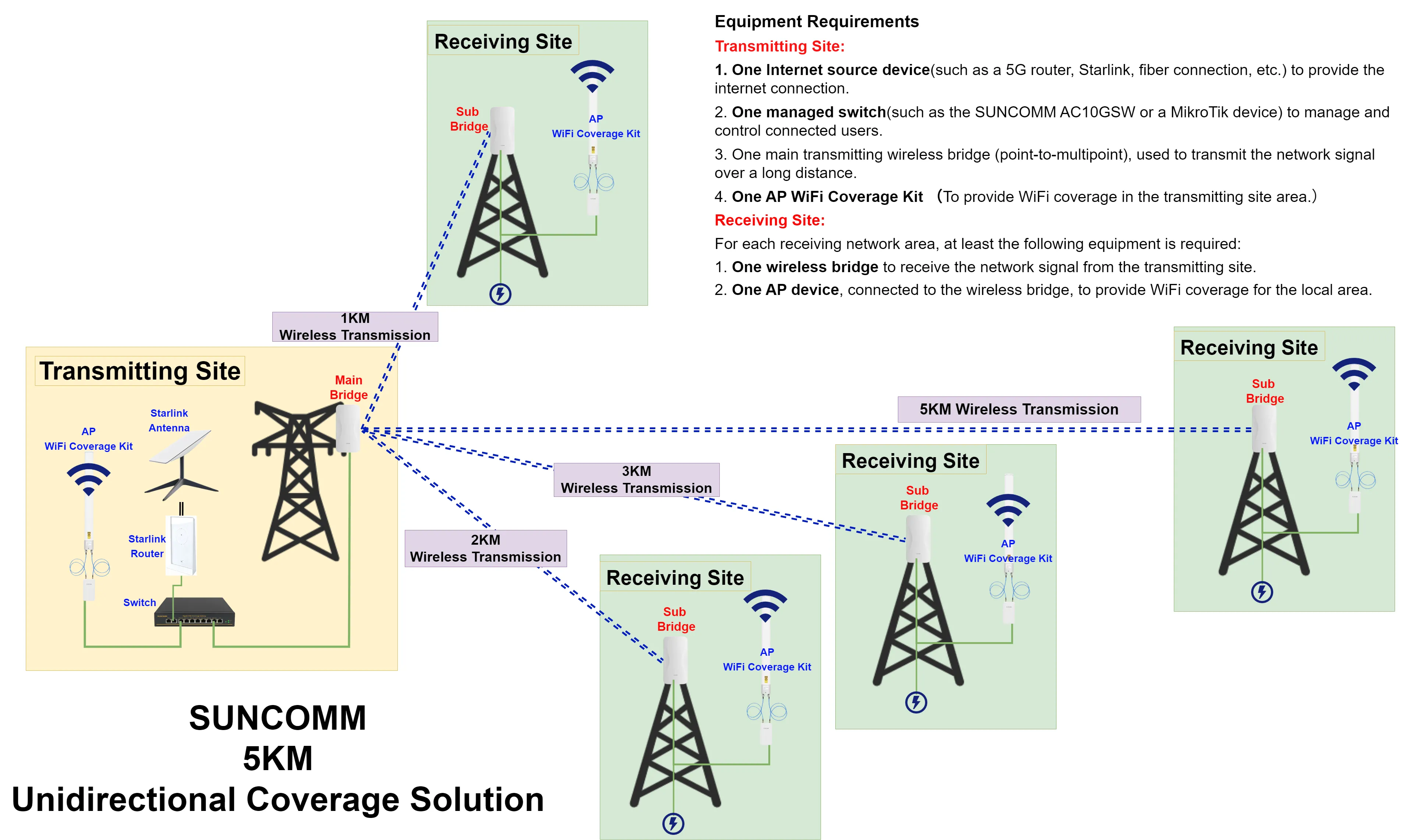
One main station is placed on a tower or a high place a sector antenna covers remote sites and several wireless bridges connect locations that are between 1 kilometer and 6 kilometers apart.
Before thinking about speed, quality of service or network setup there is a more important question to ask:
Can every wireless link create a strong physical connection in the first place?
For a long-distance point to multipoint network the physical surroundings are often more important than the equipment details.
A bridge may be said to work up to 5 kilometers, 10 kilometers or even further. This does not mean every place within that range will have a strong connection.
Hills, buildings, trees, antenna height antenna beamwidth, the shape of the Earth and signal margin can all decide if the network works properly.
This article covers the important physical planning points when designing a 5 to 6 kilometer point to multipoint wireless bridge network.
The first thing needed for a long distance wireless bridge is usually Line of Sight or LOS.
In a point to multipoint network every remote station needs to communicate with the station through a wireless path.
Ideally there should be no physical things between the antennas.
Things that can block the way include:Buildings, Trees, Hills, Mountains, Roof structures, towers
If any of these things block the wireless path the link may have:Less speed, Lower data rates, Data loss, More delay, Unstable connections, Frequent drops
This is very important in a point to multipoint setup.
A network might have four sites and three of them work well. However if the fourth site has line of sight that one place can become a weak point in the whole network.
That is why every remote station should be checked individually.
Seeing the Tower Is Not Always
A common mistake is only looking with the eyes.
If workers can see the tower with their eyes they may think the wireless link has clear line of sight.
Wireless communication needs more than just seeing the other place.
The Fresnel Zone should also be considered.
The Fresnel Zone is an area around the radio path between two antennas. If big objects are in this area they can affect how the signal travels even if the antennas are still visible.
For example a line of trees or a small hill may not block the path but can block part of the Fresnel Zone and make the link worse.
That is why professional planning should look at: line of sight plus Fresnel Zone clearance, not just seeing the other side.
At short distances Earth curvature usually has little effect on tower planning.
However when the wireless link is 5 to 6 kilometers it should be part of the site survey and the terrain calculation.
At 6 kilometers the Earth’s curve can add about 2.8 meters of blockage compared to a straight line depending on the model used and the antenna shape.
This does not mean that every 6 kilometer wireless link needs a 2.8 meter tower.
The actual setup must look at the terrain.
It does mean that tower planning should not be based only on things that can be seen.
The following things should be checked together: Ground height, Terrain shape, Building height, Tower height, Antenna height, Earth curvature, Fresnel Zone space
A small hill in the middle of a 6 kilometer path can be a problem even if both towers are tall.
Why a Site Survey Is Important
Before setting up each remote station should be checked properly.
The survey should note: GPS coordinates, Distance from the main station, Direction, Ground height, Tower height, Antenna height, obstacles, Terrain shape
This helps to see if the planned setup can get enough line of sight.
The farthest station should be paid attention to.
In a network where remote placesre from 1 kilometer to 6 kilometers the 5 to 6 kilometer link is usually harder to plan than the closer ones.
A test at 1 kilometer does not prove that the 6 kilometer site will work the same.
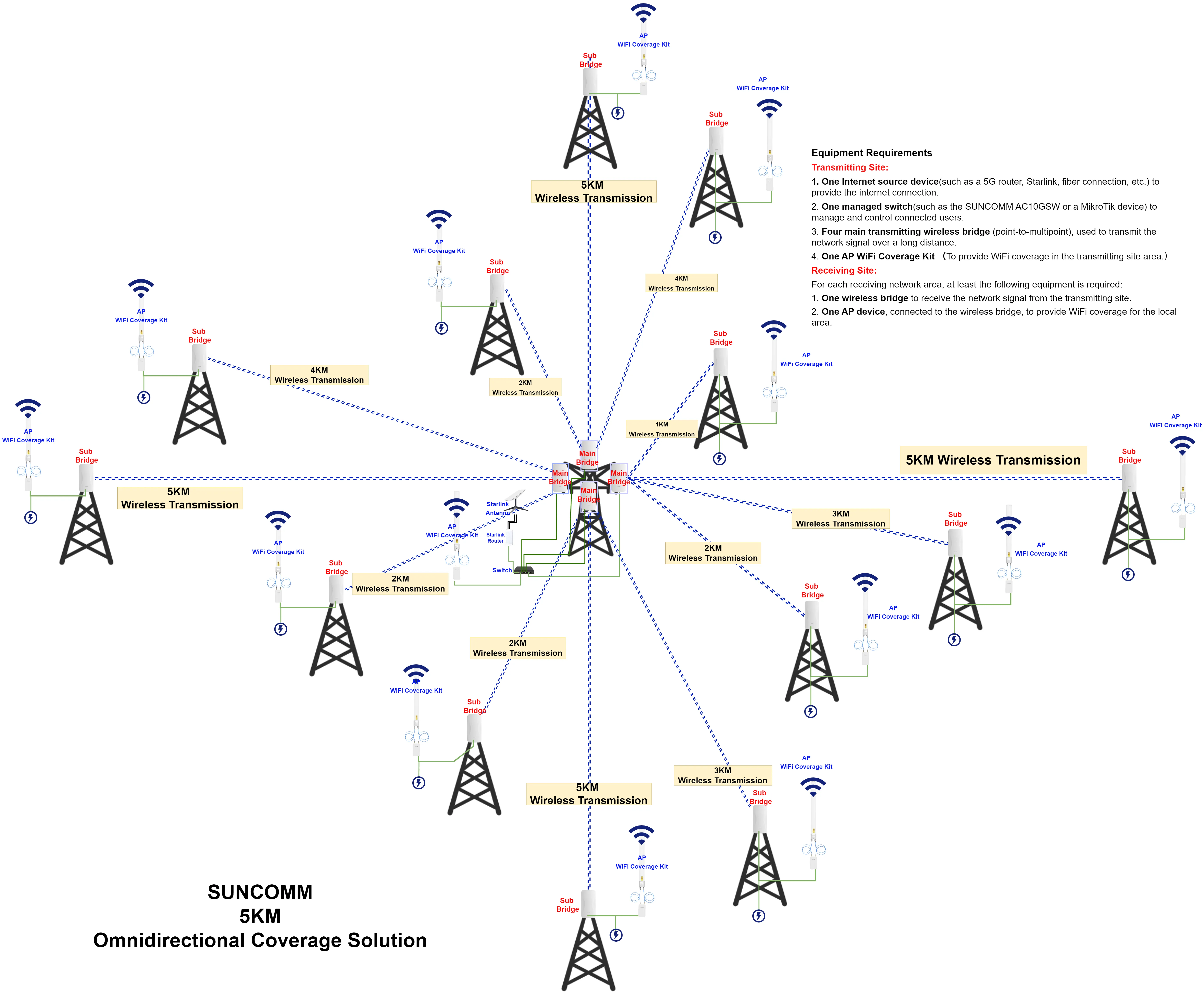
A 120 degree sector antenna is used when many remote stations are spread out over an area.
One important thing is often not understood.
The 120 degree number mainly talks about coverage.
It does not mean the antenna gives the coverage in all directions or at all angles up and down.
A sector antenna has a three shape of coverage.
So both these need to be considered:
Horizontal Beamwidth
This shows how wide the antenna covers from left to right.
Vertical Beamwidth
This shows how wide the antenna covers up and down.
The vertical beamwidth is often much smaller than the one.
This can cause problems when the remote stations are at different heights.
A Site Can Be Inside the 120 Degree Sector. Still Have Poor Coverage
Imagine four remote stations:
Site A: 1 kilometer away
Site B: 2.5 kilometers away
Site C: 4 kilometers away
Site D: 6 kilometers away on higher ground
All four places may be inside the 120 degree horizontal sector.
But their angles compared to the antenna may be very different.
If Site D is much higher or lower than the station it may be outside the best part of the vertical coverage.
This can lead to signal even though the site looks right on a map.
That is why planning should include:direction plus distance plus height difference
Before installation the following should be noted for every site: Horizontal direction, Distance, Ground height, Tower height, Antenna height, Vertical angle
The goal is to make sure every remote station is in both:
Horizontal sector coverage and Vertical beam coverage
This is especially important in: Areas with mountains, Hillside homes, Uneven land, Cities with different building heights
A map alone is not enough.A proper three dimensional understanding of the network area is required.
Another thing to think about is antenna performance near the edge of a sector.
A 120 degree sector antenna gives horizontal coverage but the signal is not always the same across the whole 120 degrees.
Remote stations near the center of the direction usually have a better signal than ones near the edges.
For example:
Center of sector → Stronger signal
Near the edge of sector → signal
This does not mean the edge cannot work.
A station near the edge that is also 5 to 6 kilometers away needs more attention.
A remote station that is far and near the edge of the sector may have: signal, Slower data rates, Less resistance to signal change, More sensitivity to interference
Possible fixes could include: Changing the antenna direction, Raising the tower, Improving the antenna, Using a smaller sector, Adding another sector, Creating another connection point
.webp "5km coverage (1).png")
A mistake in long distance wireless projects is using the same ideas for each remote station.
A 1 kilometer link and a 6 kilometer link are not the problem.
Each place should have its link budget.
What Is a Wireless Link Budget?
A link budget estimates the expected signal strength between two devices.
The calculation may include:Transmit power, Antenna strength, Remote antenna strength, Signal loss due to distance, Loss from cables, Loss from connectors, Receiver sensitivity
A simple formula is:
Received Signal = Transmit Power + Antenna Gains − Path Loss − System Losses
As distance grows signal loss increases.
This means the 5 to 6 kilometer stations should be calculated separately not assumed to work like the 1 kilometer ones.
The Longest Link Is Often the Weakest Link
In a point to multipoint system, the station that is the farthest is often the hardest to deal with.
It may have:, loss, Weaker signal, Lower data rates, Less room for signal change, More chance of interference
This does not mean the farthest station will fail.
It just means it needs the careful planning.
The whole network should not be considered complete until the hardest link is checked.
A wireless link should not be planned to work when things are perfect.
Outdoor areas change.
Signal conditions can be affected by: Rain, Dampness, Wind, Temperature changes, Interference, Antenna movement, Plants growin, Connectors getting
A link that works well during setup may not work well months later if there is not enough room for changes.
For long distance projects a good signal margin should be planned from the start.
As a goal engineers may aim for about 15 to 20 decibels of extra signal margin depending on the radio type, data needs and surroundings.
The exact number should always be checked using the equipment details and the actual radio environment.
The goal is not just to make the link work.
The goal is to make it stay working even when real life changes happen.
.webp "starlinkwifi (1).png")
A 5–6KM point-to-multipoint wireless bridge network begins with the physical environment.
Before considering network bandwidth or advanced configuration engineers need to answer basic questions:
Can every site clearly see the main station?
Is the Fresnel Zone sufficiently clear?
Are all stations inside both the horizontal and vertical antenna coverage area?
Does the longest link have signal margin?
These questions should be answered before installation not after network problems begin.
At SUNCOMM we believe long-range wireless networking should start with the environment than the distance printed on a product specification.
A successful deployment requires understanding the terrain calculating each link individually and designing the antenna coverage, around real-world conditions.
Once the physical layer is properly planned the next challenge begins:
How can multiple remote sites share the wireless capacity efficiently and reliably?
That is where bandwidth planning, frequency management, QoS, power protection and network architecture become critical.


