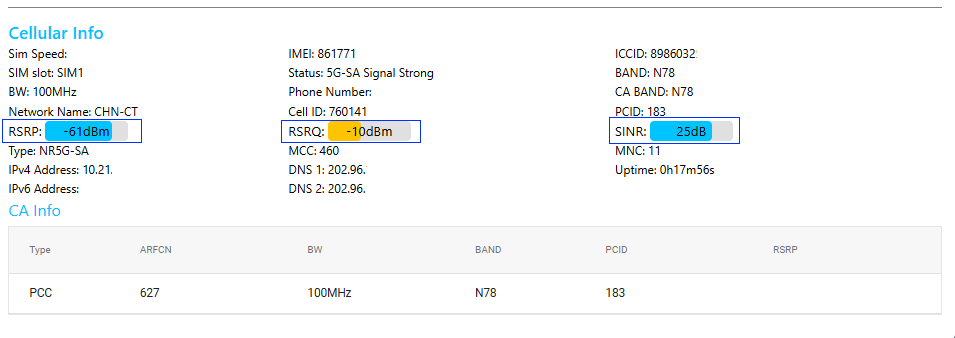
Log into the product backend, and on the homepage, you can see three values: 'RSRP', 'RSRQ', and 'SINR'.
(1) RSRP (Reference Signal Received Power): Indicates the power of the downlink reference signal received by the device, reflecting signal strength.
Excellent: -85dBm to -50dBm (strong signal, good coverage).
Fair: -95dBm to -105dBm (weak signal, may affect speed).
Poor/Very Poor: Below -105dBm (may cause disconnection).
Purpose: Used to determine base station coverage range, select the optimal base station for handover, or optimize antenna placement.
(2) RSRQ (Reference Signal Received Quality): Reflects signal quality by comparing the ratio of useful signal power to total interference and noise power (similar to signal-to-noise ratio).
Typical Range:
Excellent: -10dB to -3dB (low interference, stable transmission).
Fair: -15dB to -10dB (some interference, speed may decrease).
Poor: Below -15dB (high interference, prone to packet loss or disconnection).
Purpose: Evaluates network anti-interference capability and helps optimize network parameters or switch frequency bands.
(3) SINR (Signal to Interference plus Noise Ratio): This parameter evaluates the stability of the current wireless signal in complex electromagnetic environments.
SINR > 20 dB: Signal is excellent, supporting high-bandwidth applications (e.g., 4K video).
SINR < 0 dB: Signal is severely interfered with, which may cause disconnection or high latency.
Potential Interference Sources: Can come from other routers, Bluetooth devices, microwave ovens, and other electromagnetic sources.